A headline says the jobless rate rose from 4.0% to 4.5%. Was that 0.5, 12.5 or 11.76? All three are correct, because percent change vs percent difference vs percentage points are three different questions, and each one has its own formula.
Most of the confusion I see in reports comes from using the right number under the wrong name. Once you know which question you are asking, the formula picks itself. The percentage increase calculator shows the points, the percent change and the percent difference side by side when you tick its rates box; the rest of this page explains what each one means and when to use it.
Three questions, three formulas
| Measure | Question it answers | Formula |
|---|---|---|
| Percent change | How much did this move, relative to where it started? | (new − old) ÷ |old| × 100 |
| Percent difference | How far apart are these two values, with no before or after? | |a − b| ÷ ((|a| + |b|) ÷ 2) × 100 |
| Percentage points | What is the plain gap between two percentages? | new − old |
The pair that people mix up most is the first and the third, because both are about something going up. The second is the odd one out: it has no direction, and it is the one to reach for when neither value is "the starting one".
Percent change: a direction and a starting point
Percent change divides by the starting value, so it is not symmetric. From 80 to 100 the change is 20 ÷ 80 = +25%. From 100 back to 80 it is −20 ÷ 100 = −20%. Same two numbers, same gap of 20, two different percentages, because the base changed. That is why a 25% rise is undone by a 20% fall, as the price increase guide works through.
Use percent change whenever one value clearly comes first: last month and this month, the old price and the new price, the pay before and after a raise.
Percent difference: two values, no order
Compare two shops selling the same item at 80 and 100, or two instruments reading 80 and 100. Neither is the original. Percent difference divides the gap by the average of the two: 20 ÷ 90 = 22.22%. Swap them and you still get 22.22%.
Be careful with the name. Sources differ on the denominator: some use the average, some the larger value, some one of the two numbers chosen by the author. The page at calculatepercentage.info lays out the contrast with percent change and notes the variations. Whichever you use, state it, because 22.22%, 20% and 25% are all "the difference between 80 and 100" depending on the convention. The tool uses the average, with the absolute value of each number, and labels it as a separate line so it is never confused with the percent change.
Percentage points: subtract, do not divide
When both numbers are themselves percentages, such as an interest rate, a conversion rate or a share, the plain gap is measured in percentage points. It is a subtraction with no division at all.
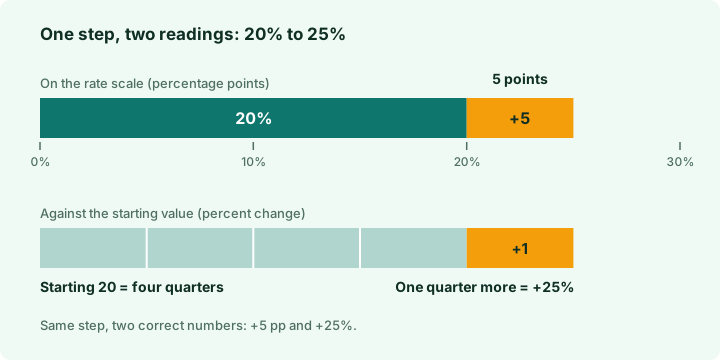
The standard example from Wikipedia's entry on the percentage point: a rate moving from 40% to 44% is up 4 percentage points, and also up 10% in relative terms. A second illustration at Mathwords has 20% going to 25%: five points, and 25% relative. And Macroption shows 10% to 20% as ten points and a relative change of 100%, which is how a rate "doubling" can sound very different from "up ten points".
| From | To | Percentage points | Percent change | Percent difference |
|---|---|---|---|---|
| 3.5% | 4.25% | +0.75 pp | +21.4286% | 19.3548% |
| 4.0% | 4.5% | +0.5 pp | +12.5% | 11.7647% |
| 20% | 25% | +5 pp | +25% | 22.2222% |
| 40% | 44% | +4 pp | +10% | 9.5238% |
| 10% | 20% | +10 pp | +100% | 66.6667% |
How to write it so nobody misreads it
- For a rate changing, say points: "the rate rose by 0.5 percentage points", abbreviated pp or p.p.
- If you give the relative figure, name it: "an increase of 12.5% on the old rate".
- Give the starting value so a reader can check you: "from 4.0% to 4.5%".
- Never write "up 5%" for a rate that went from 20% to 25% unless you mean 25% relative to 20. If you mean five points, write five points.
A rule of thumb I use: when a rate is the subject, quote the points first, then the relative change in brackets. The points tell people the size of the move on the scale they know; the bracket tells them how large it is compared with where it began.
Negative values and a base of zero
Percent change has two awkward cases. A starting value of 0 gives no percentage at all, because you cannot divide by zero: going from 0 to 50 is a change of +50, not a percentage. And with a negative start, the plain formula flips the sign. Going from −10 to −6 is an improvement of 4, yet (−6 − −10) ÷ −10 gives −40%. Dividing by the absolute value of the start fixes it: 4 ÷ 10 = +40%. This is the convention described by Omni Calculator on relative change, and it is the one the tool uses. Be aware that percent change across a sign change, such as −10 to 5, has no neat reading: the rule gives 15 ÷ 10 = +150%, but the swing from below zero to above it is the real story, so I quote the absolute change (+15) next to the percentage.
The three in Excel and Google Sheets
Excel has no ready-made percent change function. Microsoft's own support article, KB 214078, gives the sheet formula with the old value in A2 and the new in B2; the general guide to calculating percentages covers formatting.
| Measure | Formula | Cell format |
|---|---|---|
| Percent change | =(B2-A2)/ABS(A2) | Percentage |
| Percent difference | =ABS(A2-B2)/AVERAGE(ABS(A2),ABS(B2)) | Percentage |
| Percentage points (values typed as 3.5 and 4.25) | =B2-A2 | Number |
One trap: if the cells already hold true percentages (0.035 shown as 3.5%), the subtraction returns 0.0075, and formatting it as a percentage shows 0.75%, which a reader will take for a relative figure. Multiply by 100 and format as a number, then label the column "pp".
Choosing in ten seconds
| If you are asking | Use |
|---|---|
| "How much did my pay or price move?" | Percent change (salary guide) |
| "How far apart are these two, neither being the original?" | Percent difference |
| "By how many points did this rate move?" | Percentage points |
| "What yearly rate gives that total?" | Compound growth, see the CAGR guide |
Frequently asked
What is the difference between percent change and percent difference?
Percent change divides by the starting value and has a direction. Percent difference divides the gap by the average of the two values and has no direction. For 80 and 100: change is +25% from 80, difference is 22.22%.
What is the difference between percentage points and percent?
Percentage points are the plain subtraction of two percentages. Percent change divides that gap by the starting percentage. A rate from 20% to 25% is 5 points and a 25% relative increase.
Why is a 40% to 44% rise both 4 points and 10%?
The gap is 44 − 40 = 4 points. Divide that gap by the starting 40 and you get 10%. Both are true; they answer different questions.
How do you calculate percent change with a negative number?
Divide the difference by the absolute value of the starting number. Going from −10 to −6 gives 4 ÷ 10 = +40%.
Can I calculate percent change from zero?
No. Dividing by a zero start is undefined, so only the absolute change can be reported.